*PMS Integration must be activated by Inn-Flow first. Please contact Customer Support to activate your property for the correct PMS Integration option.* This version is the Choice2 import that supports the import file to be received via email.
If you're in implementation, you do not need to contact Customer Support as your Implementation Specialist has already configured Choice on the backend.
Choice Download and Import Instructions for Daily Activity
To complete the Choice Daily Activity Auto Import, there are 3 main steps to be completed.
Part 1 is downloading the file.
Part 2 is emailing the file to Inn-Flow. (to an exclusive PMS email)
Part 3 is logging into Inn-Flow to approve the day.
Part 1:
Within Choice, please run the Back Office Report on a nightly basis using the step by step instructions below.
Within the Choice PMS, under Run then select Reports

Under the section for Accounting Reports, select the Back Office Report

Select Submit to download the file. It would automatically download in the necessary format.
Part 2:
Via email, email the Back Office Report to your hotel's specific Daily Activity Email address. This can be found within Inn-Flow / Administration / Entities / Select the hotel / Import Email Address Tab. The email address should have 5 digits_CHOICE2-PMS@inn-flow.net.
The email MUST contain a subject line. It's preferred to put the Date of the file that you're sending. If the email does not have a subject in the email, the file will not import.

Email the Back Office Report to this email address.
Part 3:
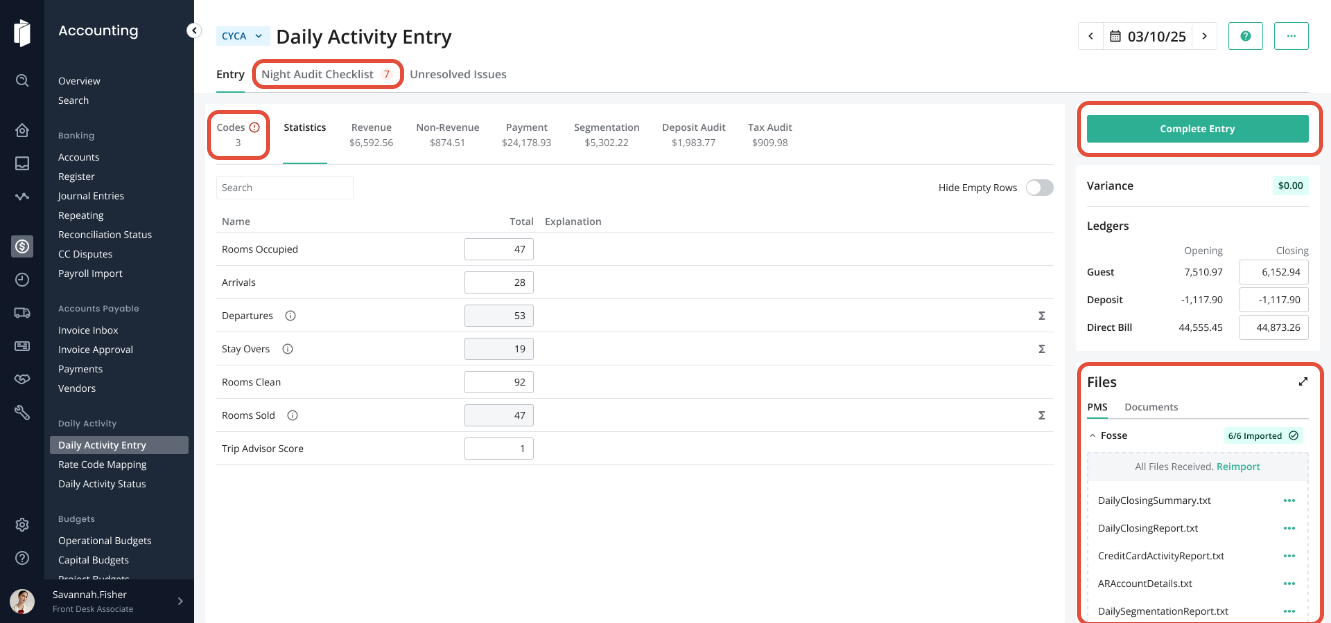
Log into Inn-Flow / Accounting Module / Daily Activity Entry:

To ensure the daily activity imported successfully, there should be values in the each tab of the page. The Files section should also be green and show "Imported".
The data will be displayed in each section as expected, and any Codes that need to be mapped will be called out on the "Codes" tab.
We STRONGLY suggest that you upload PDF version of the reports, or additional night audit reports, within the Documents tab of the file area.
Complete the Night Audit Checklist then Complete Entry to move to the following day.
Was this article helpful?
That’s Great!
Thank you for your feedback
Sorry! We couldn't be helpful
Thank you for your feedback
Feedback sent
We appreciate your effort and will try to fix the article