See below for more details into the enhancements released:
TABLE OF CONTENTS
Accounting - Daily Activity 2.0 Updates
A round of UX improvements to Daily Activity Entry:
- The Files section now expands by default when no files have been received, so it's obvious where to drag and drop.
- The Complete Entry button shows a helpful tooltip when data is missing and a confirmation message on success.
- Seasonal hotels with no activity can now complete a day without workarounds — a warning modal confirms the zero-data entry.
- Tightened spacing and alignment throughout the entry tabs.
Accounting - Invoice Entry
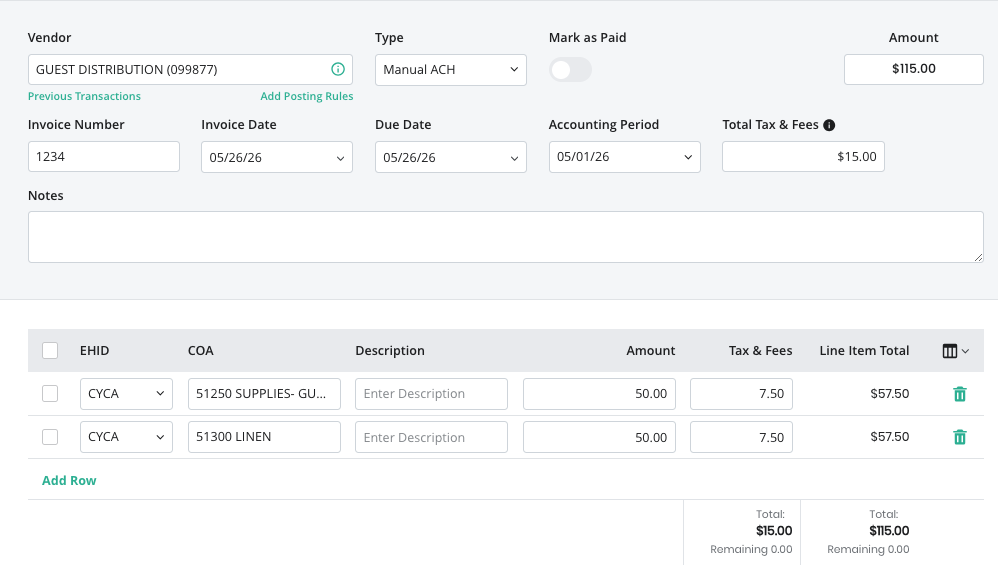
We have added a new Tax & Fees feature to the invoice entry slide out to assist customers in allocating tax & fee amounts to line items.
- There is an optional “Total Tax & Fees” amount field in the invoice header.
- Entering an amount here will assist when allocating these to each line item so that the user understands how much tax & fees they have left to allocate.
- For each line item, there is now a “Tax & Fees” input field where the user can enter the amount of tax/fees they wish to allocate for each line item.
- The line-item amount + tax & fees will equal the total line-item amount.
Business Intelligence Daily Flash — F&B Revenue & Other Revenue Columns
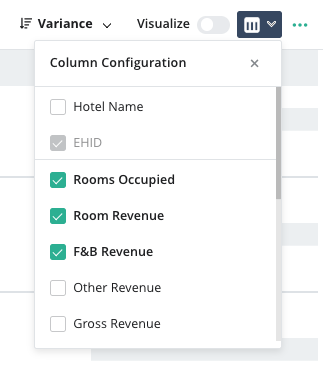
Two new revenue columns are now available in the Daily Flash table, giving owners and operators a more complete picture of daily property performance beyond rooms revenue alone.
- A new F&B Revenue column displays daily Food & Beverage revenue for the selected property, sourced directly from PMS-reported revenue categories.
- A new Other Revenue column captures non-room, non-F&B revenue streams (e.g., parking, resort fees, laundry, miscellaneous income), calculated as total revenue less Rooms and F&B.
- Both columns support Daily, MTD, and YTD views, with Budget Variance, Last Year Variance, and Last Two Year Variance filter options.
- Values are consistent with what appears in other relevant modules (e.g., Accounting P&L report) and have been validated across single-property, group, and multi-property configurations.
- Both columns are selectable via the column picker and are included in the default Revenue column set. F&B Revenue will appear by default for properties with F&B outlets.
- Column values are exported to Excel when using the Export function; the column configuration displayed on screen is preserved in the downloaded file.
- Currency formatting ($) is applied throughout; a "—" is displayed where data is unavailable, and "Not Available" is shown where the PMS does not support a revenue breakout.
Important — data prerequisite: F&B Revenue and Other Revenue data depend on PMS revenue category mappings. If a PMS does not support a breakout of F&B or Other revenue, the column will display "Not Available."
Business Intelligence Deposit Audit — Total Row for Net Adjustment & Commission Totals
The Deposit Audit table now includes a Total Adjustments & Commissions row at the bottom, making it easier to assess the net impact of adjustments across the full period at a glance.
- The Total Row displays the net sum of adjustment and commission amounts for each payment column (e.g., AMEX, Cash & Check, Discover, POSVI, Visa/MC, Wire Transfer).
- Summing logic uses adjustment and commission values (e.g., Cash Over/Short amounts) — not the raw deposit figures — so positive and negative entries offset each other in the net calculation.
- All payment columns display a total value, even if $0.00, to maintain consistent visual alignment across the row.
- This enhancement is particularly useful for customers who use Deposit Audit to review the work of external accountants, where adjustments across days are expected to net near zero over the course of a month.
Was this article helpful?
That’s Great!
Thank you for your feedback
Sorry! We couldn't be helpful
Thank you for your feedback
Feedback sent
We appreciate your effort and will try to fix the article